

 Reviews
Turn your regulars into Google reviews.
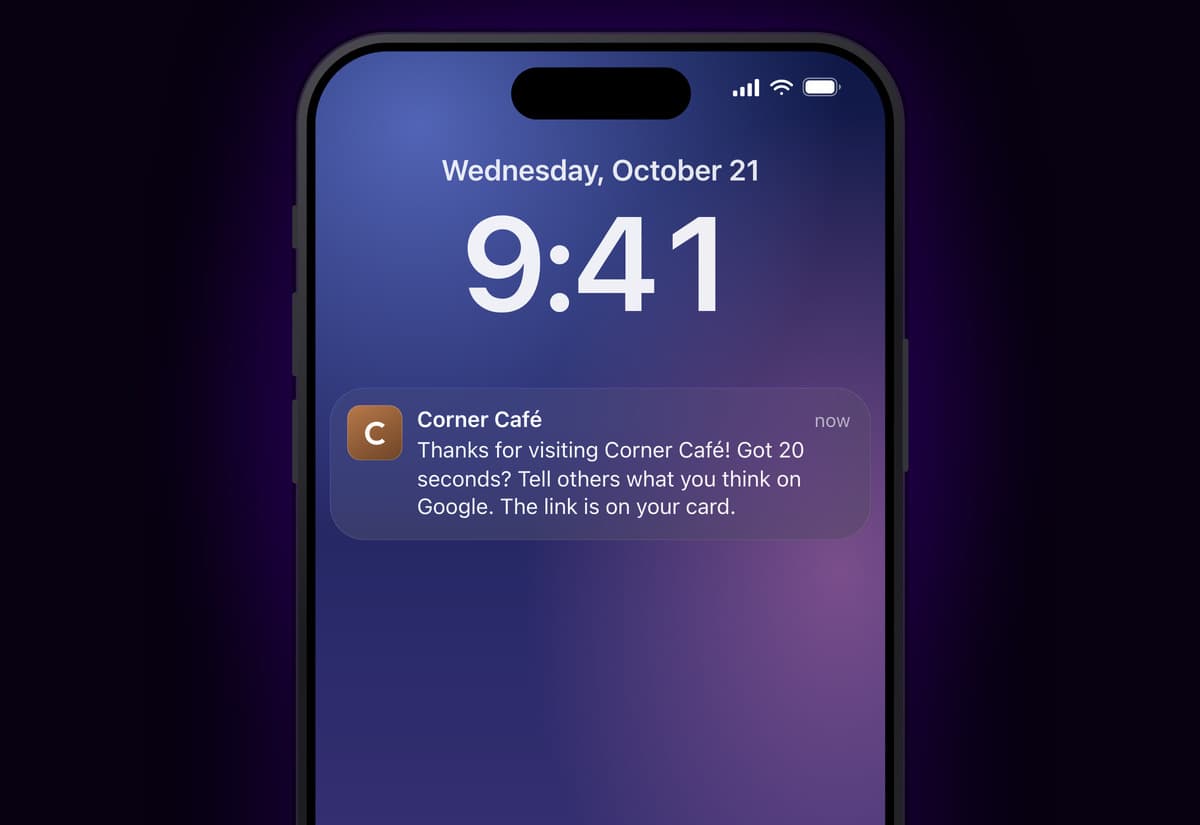
A few hours after a customer's 2nd visit, their Passtastic wallet card asks them once for a Google review. One tap opens Google's review box for your shop. Your staff do nothing at the counter.
Already a customer? Set up Google reviews opens your dashboard.










A review request that sends itself.
Asked once, at a good moment
A few hours after a customer's 2nd visit, between 10:00 and 20:00 shop time. Each customer is asked once, ever.
The link stays on the card
"Review us on Google" sits on their wallet card and on your business page, so they can leave a review whenever they like.
You see it working
Your dashboard shows how many customers were asked and how many tapped the link.
Nothing for your team to do.
The request goes out after the customer has left, so there is nothing to remember and nothing to say.
Only returning customers
A customer is asked after their 2nd visit, never on the first. Only visits after you turn it on count, so nobody gets a message the day you switch it on.
Their phone, not your counter
The message arrives on the lock screen of their wallet card, hours after the visit.
The right shop
With several shops, a customer is asked about the shop they last visited, using that shop's Google listing.
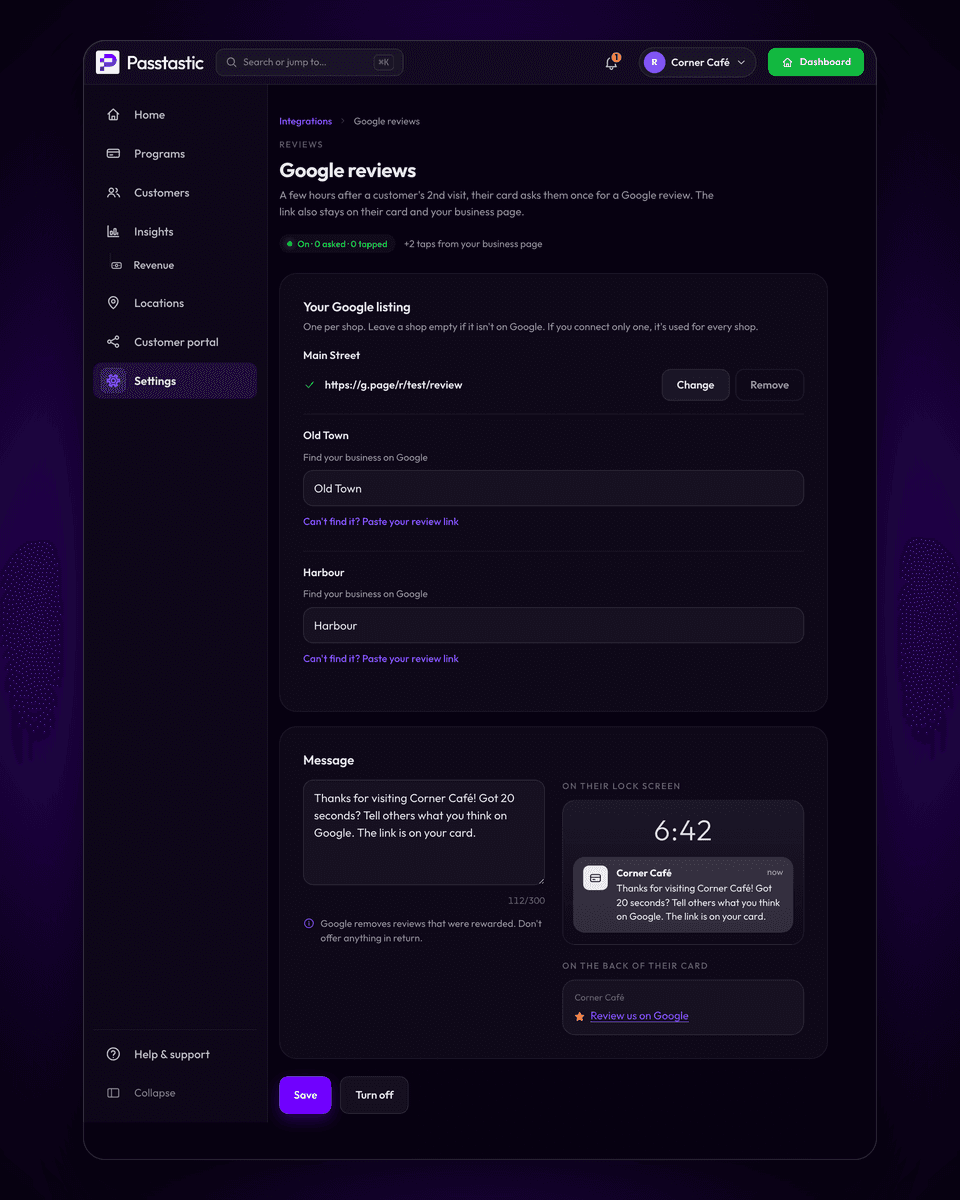
Set up in 3 steps.
Find your business on Google
Type your business name and pick it from the list. For several shops, pick one listing per shop. Can't find it? Paste your review link.
Check the message
It is already written, with your business name in it. Edit it if you like.
Turn on
Click Turn on. New requests start after the next visits.
The concerns we hear most.
Do I have to do anything at the counter?
No. The request goes to the customer's wallet card hours after the visit. Your team says nothing and scans nothing extra.
Will everyone get asked on day one?
No. Only visits after you turn it on count, so your regulars are asked after their next visit, not all at once.
Is it allowed by Google?
Yes. Google allows asking customers for genuine reviews as long as you don't reward them, ask only happy customers, or pressure people in your shop. Google reviews is built around those rules.
What does it cost?
It is included on Multi-Location and Groups & Brands. There is nothing extra to pay.
Google reviews, answered.
Do I have to do anything at the counter?+
No. The request is sent to the customer's wallet card a few hours after their visit. Google asks businesses not to pressure customers to review while they are in the shop, so nothing happens at the counter on purpose.
Can I give a stamp or points for a review?+
No. Google removes reviews that were rewarded and can suspend the listing, so Passtastic has no option for it. Don't offer anything in return in your message either.
Will unhappy customers be asked too?+
Yes. Everyone who qualifies is asked the same way. Google does not allow asking only the customers you expect to be happy.
Do I see my new reviews here?+
Not yet. You see how many customers were asked and how many tapped the link. Your reviews themselves stay in Google.
I have several shops.+
Connect each shop's Google listing and customers are asked about the shop they visited. If all your shops share one Google listing, connect that one and it is used for every shop.
Related integrations.

Zapier
New customer, reward earned, card redeemed: each event can start a Zap in any app Zapier connects to.
Web sign-up
Wallet buttons or a full form on WordPress, Squarespace, Wix, Shopify, or any site that accepts HTML.

Square POS
Customers earn when your staff add them to the sale in Square; rewards live on your card and show up in Square by name. Works on plain Square, no loyalty add-on.
More Google reviews,
without asking at the counter.
Start your free 14-day trial and turn on Google reviews in about two minutes.
Square is a trademark of Block, Inc. Zapier, Make, Holded, Lightspeed, Odoo, IdoSell and Shoper are trademarks of their respective owners. Passtastic is not affiliated with them unless stated.