Referral Loyalty Program: Let Customers Bring Their Friends
Refer a friend is now in Passtastic, on every plan. Each customer gets a personal link, and you only reward them when the friend actually comes in and buys.

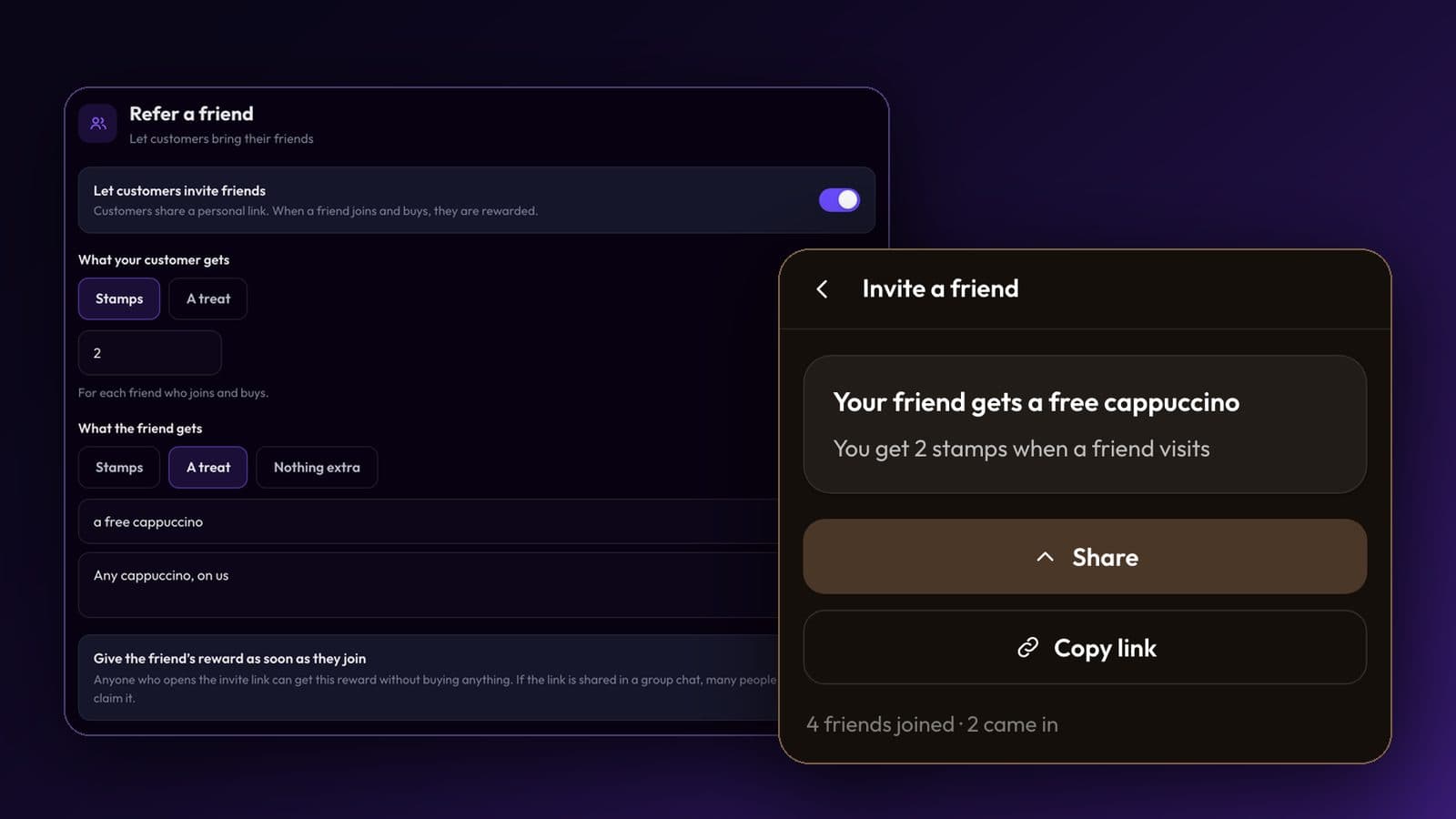
Your best new customers already come from your regulars. A referral loyalty program just says thank you for it. Passtastic now has Refer a friend: every customer gets a personal invite link on their wallet card, and they're rewarded only when the friend really comes in and buys. It's on every plan, at no extra cost. This guide covers how a referral program works for a small shop, what to give, how to set it up, and how to keep it from being gamed.
What is a referral loyalty program?
A loyalty card rewards a customer for coming back. A referral program rewards them for bringing someone new. Put the two together and the same card does both jobs: your regular collects stamps for their own coffees, and earns a couple more when a friend they sent orders one.
For a café, a restaurant or a salon this is the natural way to grow. People pick a hairdresser because a friend's hair looked great. They try a lunch place because a colleague won't stop talking about it. That word of mouth happens anyway. A referral program makes it easier to pass on, and gives the person doing it a reason to bother.
It also brings the right people. A friend who comes in because your regular recommended you already knows what you're good at. They arrive with a reason to like you, which a stranger from an ad doesn't have.
Why don't most refer-a-friend programs work for small shops?
Most small businesses have tried some version of "bring a friend, get a discount". It usually fades out for one of three reasons.
- Nobody remembers it. A paper flyer or a line on the menu is forgotten by the time your customer is talking to their friend. The offer has to be in their pocket at that moment.
- The code goes everywhere. A discount code shared in a big group chat gets used by people who were never going to become regulars. You pay for every one of them.
- You pay for sign-ups, not customers. If the reward comes when someone joins, people join for the freebie and never come back. You've rewarded a form, not a visit.
Two things help before any software does. First, ask at the happy moment: when a customer redeems their free coffee or loves their new colour, that's when they'll tell a friend. Second, have your staff say it out loud once: "If you bring a friend, you both get something." A program nobody mentions stays a secret.
How does Refer a friend work in Passtastic?
Your customer has the invite link with them all the time, because it lives on their loyalty card. It shows in two places:
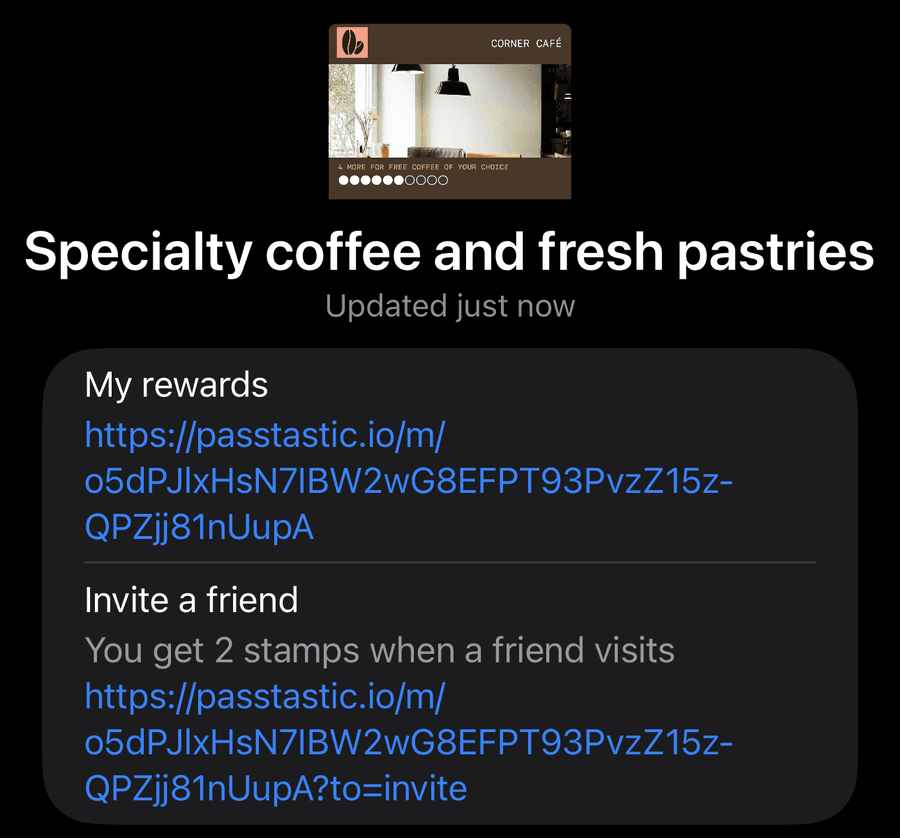
- On the back of their Apple Wallet or Google Wallet card, with a line like "Invite a friend: You get 2 stamps when a friend visits".
- In their own page in your customer portal (the page they open from "My rewards" on the card), as an Invite a friend tile.
On an iPhone it sits on the back of the card, right under My rewards: one line with the reward and the link below it. One tap opens their invite page.
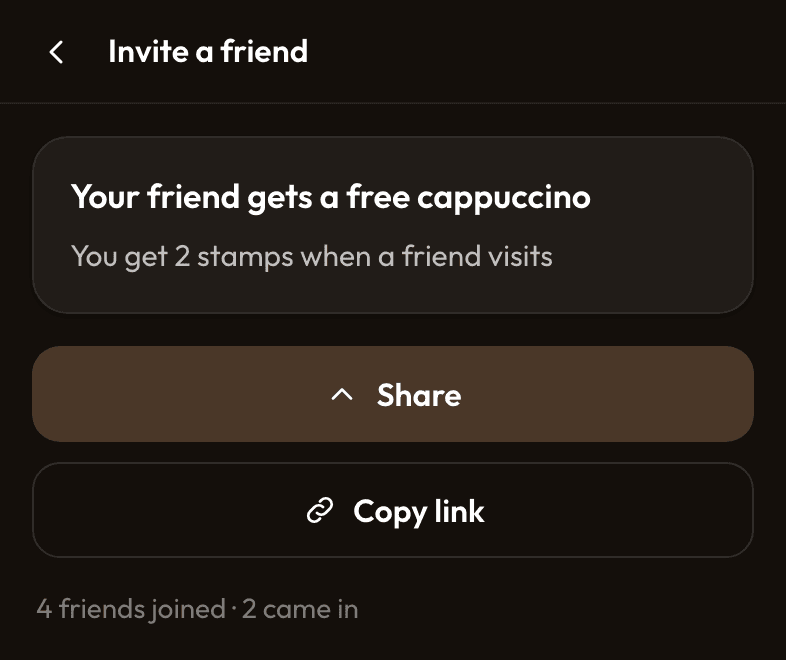
The tile opens a page with both rewards spelled out, a Share button that opens the phone's own share sheet (WhatsApp, Messages, Instagram, whatever they use), and Copy link. It also shows how many friends have joined and how many have come in, so your customer can see their own progress.
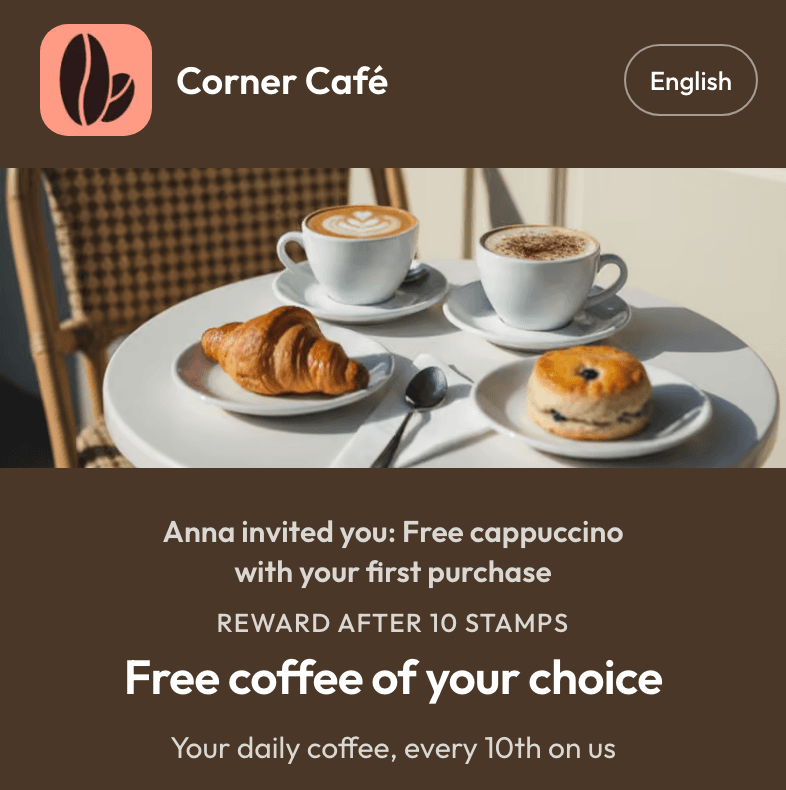
The friend taps the link and lands on your join page, with your logo and photo and a line at the top: "Anna invited you: Free cappuccino with your first purchase". They fill in their details and add the card to their wallet like any other customer. There's no app to download, for either of them.
Here's the part that matters for your margins: your customer is rewarded only when the friend really comes in. That means the friend's first stamp, first points or first visit, added at your counter with the scanner or by a connected till. Joining alone pays nothing. So a link shared in a group chat of 200 people costs you nothing until one of them walks in and buys.
The friend also has to be new to you. If someone who already has your card opens the link, the page tells them the invite doesn't add a reward. Passtastic checks the email or phone number they give.
How to set up a referral program in a few minutes
If you already run a card on Passtastic, it's a few switches. If you don't, you'll do this right after creating your card.
Step 1: Open Refer a friend
Go to Programs, open your program, and in the Setup tab open Refer a friend. Turn on Let customers invite friends. If your customer portal is still off, you'll be asked to switch it on, since that's where the invite page lives.
Step 2: Choose what your customer gets
Under What your customer gets, pick Stamps, Points or A treat, depending on your card. A treat can be anything you name: "a free coffee", "a free hair mask", "dessert on us".
Step 3: Choose what the friend gets
Under What the friend gets, pick stamps, points, a treat, or Nothing extra. By default the friend's reward unlocks with their first purchase, the same as your customer's.
Step 4: Set the rules and publish
Set Friends per customer (10 by default, or Unlimited) and What counts as buying. Check the wording under What customers will read, then click Publish. From that moment every customer's card carries their own link.
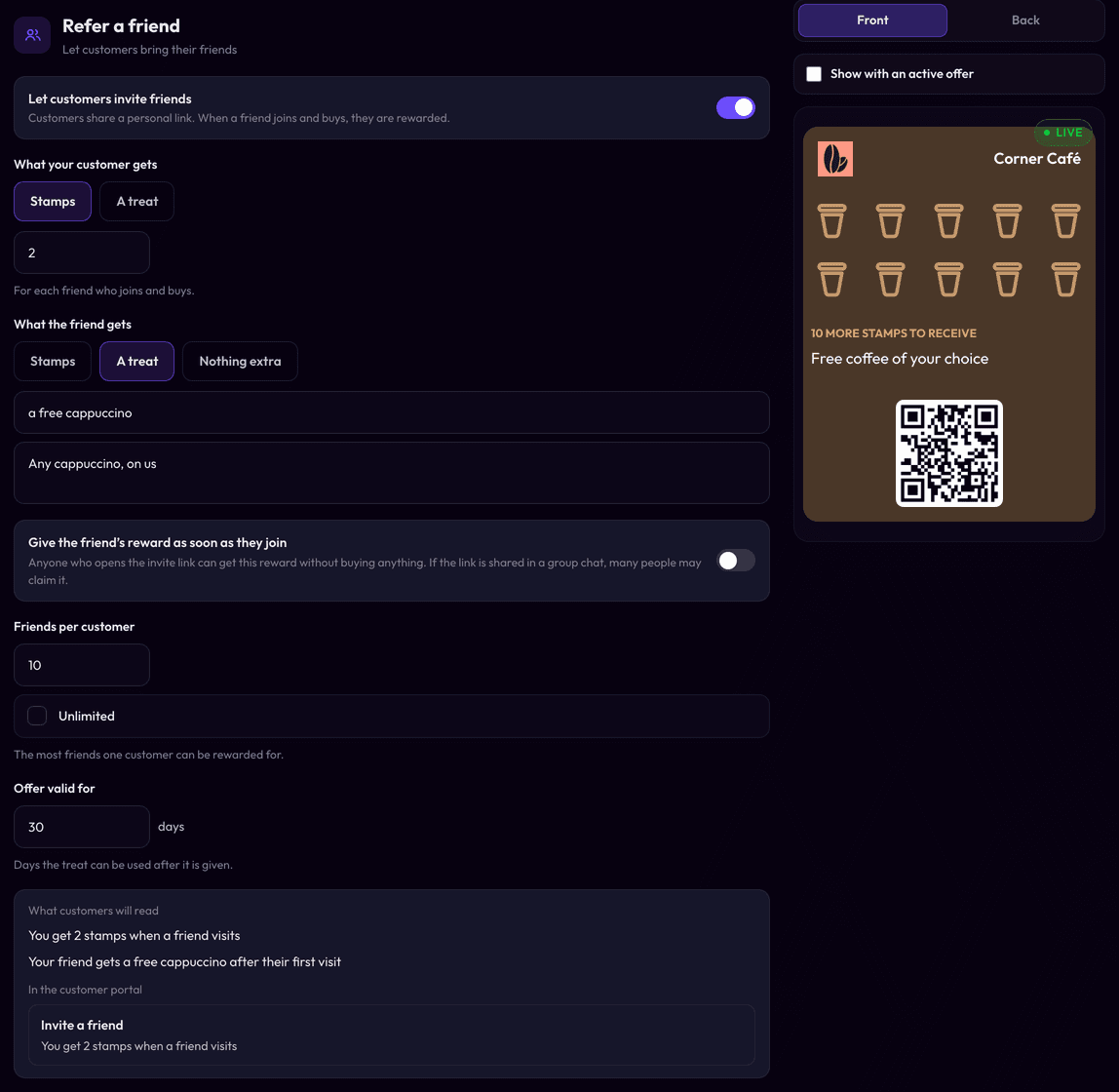
Every setting is explained in the Refer a friend help guide, including how it works on coupons, memberships and prepaid cards.
What reward should you give in a referral program?
Give your customer something that feels like a real thank-you, and give the friend a reason to come in the first time. You don't need big numbers. Here are starting points by type of business.
| Business | Your customer gets | The friend gets |
|---|---|---|
| Café (10-stamp card) | 2 stamps | A free cappuccino with their first purchase |
| Restaurant (points per €) | Points worth a dessert | A free dessert with their first meal |
| Hair or nail salon | A treat: a free hair mask or nail art at the next visit | A treat after their first appointment |
| Yoga, fitness or padel studio | Points towards a free class | A free drink or a guest pass after the first visit |
Café. Two stamps on a ten-stamp card brings your regular's next free coffee two visits closer. That's something they notice, and it costs you less than the coffee their friend just bought. If you're not sure what a stamp is worth on your card, see how many stamps a loyalty card should have.
Restaurant referral program. A restaurant usually earns more per new guest, so it can be a little more generous. On a points card that counts the amount spent, set What counts as buying to A minimum, for example €20. A friend who only stops by for an espresso then doesn't trigger the reward, but a friend who comes for dinner does. There's more on running a card for a dining room on our page for restaurants.
Salon referral program. In beauty, the treat beats the discount. A free treatment add-on costs you a few minutes and a little product, and it feels like a gift, not a price cut. Your clients already recommend you. This makes it worth their while to send the link.
Studios and gyms. Points that add up to a free class work well for the member. For the friend, keep it small: the first class is already the reason they came.
One rule for all of them: reward the friend after the first purchase, not on joining. You can switch that on (Give the friend's reward as soon as they join), and the app warns you why it's risky. A free reward for filling in a form is exactly what gets shared in group chats.
How do you stop customers from gaming it?
Most of the protection is built in, and you don't need to watch it.
- Rewards wait for a real purchase. No first stamp, points or visit, no reward.
- Friends must be new to you. An existing customer can't be "invited" for a reward.
- There's a limit per customer. The default is 10 friends. Only friends who actually came in count towards it. Choose Unlimited if your regulars are real ambassadors.
- You decide what counts as buying. Any purchase is the default. On points cards you can ask for A minimum: an amount of money if your card gives points for what's spent, or one of your products if it gives points per product. On a stamp card, a stamp only lands when your staff or your connected till add it, so it already means someone bought something.
The one setting to think twice about is giving the friend's reward on joining. Leave it off unless you're sure.
How do you know your referral program is working?
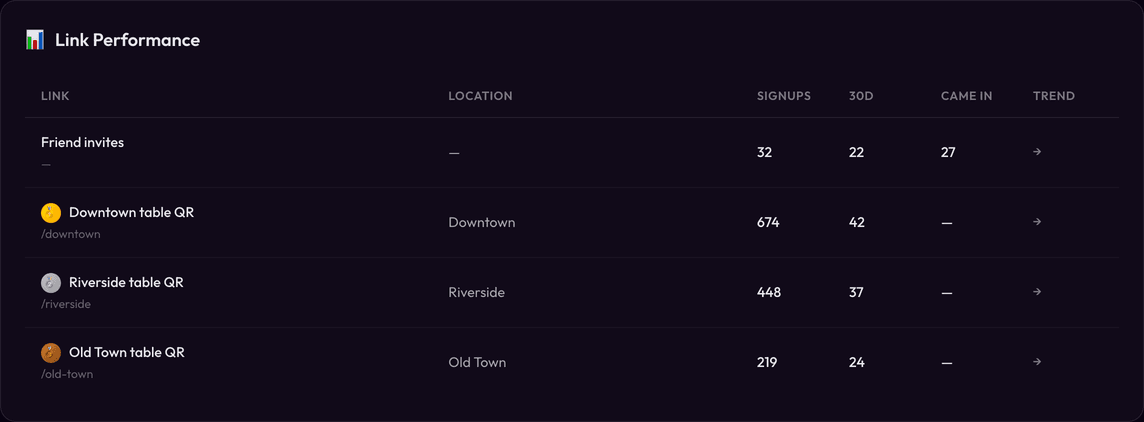
Open Insights and look at Link Performance. Invite links get their own row, Friend invites, with the number of sign-ups, the last 30 days, and how many Came in. That last number is the one to watch: friends who bought, not just friends who joined.
On Customers there's a Friends column and a Most friends brought sort, so you can see who your best ambassadors are. Open a customer to see who invited them, or how many friends they've brought. If three of your regulars bring half your new faces, that's worth a personal thank-you at the counter.
What a referral program won't do
It's worth being clear about the limits.
It won't create word of mouth for a place people don't love. A referral reward makes it easier to recommend you. It doesn't give anyone a reason to. Fix slow service or a cold dining room first.
Your customers still need reminding. The link is always on their card, but most people won't look at the back of a wallet card unprompted. Mention it at the counter, put it on a small sign by the till, and send your card holders a message the week you switch it on.
It doesn't work on every card. Invite links aren't available on members-only cards (the ones that only let in people with a code from you), or yet on cards customers buy online, such as prepaid cards and paid memberships. The Setup tab tells you if that's your case. A digital loyalty card with stamps or points is the simplest home for it.
We have younger groups, students. They come back and they are like, oh I have the card! I have the card! And they show it to their friends, and their friends say, oh my god, I also want the card.

Your customers already show your card to their friends. Now the card can do the inviting. If you're not on Passtastic yet, create your loyalty card and switch on Refer a friend in the same sitting. The 14-day free trial needs no credit card.
Let your regulars bring their friends, and reward them only when those friends buy.
Create your loyalty card