Loyalty Program for Holded TPV: Stamps and Points on Every Ticket
Holded TPV has no loyalty program of its own. Here's how to add one that earns a stamp or points from every ticket with a customer on it, puts the card in their phone wallet, and needs no developer and no second device at the counter.


Holded TPV doesn't come with a loyalty program, and you don't need to change tills to get one. Connect Holded to a loyalty platform with one API key, and every ticket that has a customer on it earns a stamp or points on a card in their Apple or Google Wallet. Your staff keep the exact flow they have today. This guide shows the three steps, the one habit that makes it work, and the honest limits.
Does Holded TPV have a loyalty program?
No. Holded's TPV is the point-of-sale piece of Holded: a tablet app for iOS and Android plus a "Punto de venta" section in your Holded account. It rings up sales, handles receipts and refunds, keeps stock in sync and posts the accounting entries. On Holded's pricing page it's an add-on to your plan at €25 per shop per month (September 2026).
What it doesn't do is reward the customer for coming back. There's no stamp card, no points balance, no "you've earned a free coffee" anywhere in the ticket flow. That's not a criticism. Holded is an ERP that happens to have a till, and loyalty is a different job.
So the question isn't "how do I switch on loyalty in Holded". It's "how do I add loyalty to the till I already have". The answer is a connection, not a migration.
How does a loyalty card earn from Holded tickets?
Passtastic watches your Holded sales. When a paid ticket closes with a customer attached, it credits that customer's loyalty card:
- Stamp cards earn one stamp per paid ticket. No rule to set.
- Points and level cards earn by the rule you set on the card, for example one point per euro on the ticket.
The stamp or points appear on the card in the customer's phone wallet. Nobody scans anything to earn. Your cashier puts the customer on the ticket and takes payment, which they were doing anyway if they wanted the sale on the customer's account.
Fewer than one in eight paper cards ever gets filled. The main reason is the counter itself: the card is at home, the stamp is in a drawer, the queue is long. Earning from the ticket takes the counter out of it, because the stamp lands whether or not anyone remembers.

How to connect Holded TPV to a loyalty program
You need a Holded account where you can create API credentials, and one published loyalty card in Passtastic that can earn: a stamp, points or level card. If you haven't made one yet, create your loyalty card first, it takes a few minutes.
Step 1: Create an API key in Holded
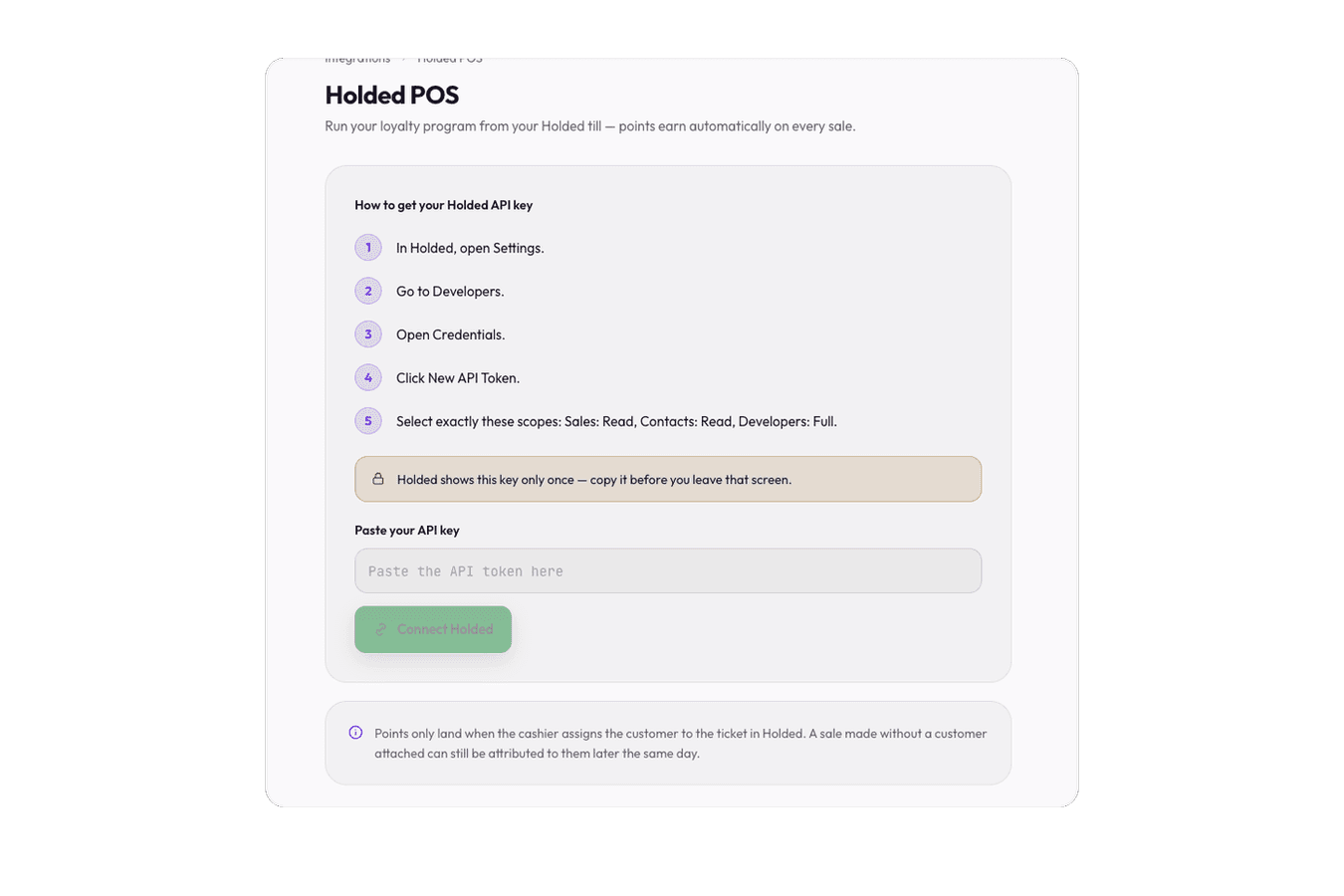
In Holded, open Settings, then Developers, then Credentials, and click New API Token. Give it exactly three scopes: Sales: Read, Contacts: Read + Write, and Developers: Full. Holded shows the key once, so copy it before you leave the screen. If you don't see a Developers menu in your Holded settings, check what your Holded plan includes.
Step 2: Paste the key into Passtastic
In your Passtastic dashboard, open Settings, then Integrations, and find Holded POS. Paste the key and click Connect Holded. That's it. No OAuth, no developer, no app installed on the tablet.
Step 3: Choose which cards earn
You'll see every points, level and stamp card in your account. Turn on the ones that should earn from Holded tickets. For points and level cards, make sure a points rule is attached, because that rule decides what a ticket is worth. Stamp cards need nothing more.
From the next sale, every ticket with a customer on it earns. The Connect Holded POS guide has a screenshot of every step if you want to follow along.
What has to change at the counter?
One thing: put the customer on the ticket.
A ticket closed with no customer earns nothing, because Holded only tells us who bought when a contact is on the ticket. Your staff search the customer by name or phone in the TPV, pick them, and close the sale as usual.
To make that search fast, Passtastic adds your members to your Holded contacts automatically. When someone joins your program, their name, email and phone land in Holded as a client, tagged "passtastic", with a reference code so you can spot them. Members who joined before you connected are filled in over the following days, up to 200 a day, so a big program doesn't eat your Holded API allowance in one go. If Holded already has someone with the same email or phone, the two are linked rather than duplicated.
Forgot to add the customer? A ticket can still be attributed to them later the same day, if it's updated before the day closes. After that, it can't be matched.
How do customers redeem a reward from Holded?
This is the honest limit. Holded doesn't show a customer's reward status at the till, so redeeming still takes a quick scan:
- 1The customer says their card is full. Your staff open the free Passtastic Scanner app on any phone and scan the wallet card. That confirms the reward is real and marks it used.
- 2Your staff apply the reward in Holded as they would any discount or free item.
Earning is automatic. Redeeming is one scan plus the discount you'd have applied anyway. For most counters that's a fair trade, because rewards happen once every eight or ten visits while earning happens every time.
Refunds are handled too. A refund from the Holded TPV creates a corrective ticket with a negative amount. Passtastic runs your points rule on that amount and takes those points back, so a partial refund only removes part of the points, and a card never goes below zero. Stamp cards only lose a stamp when a ticket is cancelled or deleted. You can switch refund clawback off if you'd rather not.
What Holded TPV loyalty looks like in practice
Say you run a bakery with the Holded TPV on an iPad. You publish a stamp card: ten stamps, then a loaf on the house. A regular joins from a QR code on the counter and their details land in your Holded contacts by themselves.
Next morning, your cashier searches "Marta", puts her on the ticket, closes the sale. A stamp appears on Marta's wallet card before she's out the door. After her tenth loaf, her card shows "reward ready". On her next visit she says so, your staff scan it, the loaf goes on the ticket at zero. Her card resets and the visit after that earns stamp one.
Nothing new on the iPad. Nothing to explain to staff beyond "put the customer on the ticket". If you ever change tills, the card stays in your customers' wallets and your staff scan it instead, so the program survives the switch.
I first used paper cards and then made an Excel spreadsheet to digitize the process a bit, but it was still really tedious to keep track of every client, especially on the busiest days.

The busiest days are exactly when a manual system fails, and exactly when a ticket-driven one doesn't care. If you run a shop with a proper regular base, that's the difference between a program that exists and one that runs.
What to watch out for
- Holded allows one sales webhook per account. If another tool already receives your Holded sales notifications, Holded will reject a second one. Disconnect or reconfigure the other tool first.
- Regenerating your Holded key breaks the connection until you paste a new one. Your card settings are kept.
- Coupons, bundles and memberships can't earn from tickets. Only stamp, points and level cards can, because those are the types that accrue per sale.
- Don't also scan for points. Once Holded is connected, a scan for the same purchase would credit the customer twice. Use the scanner for rewards, and let the ticket do the earning.
If you're setting up loyalty for the first time, the wider walkthrough is in how to set up a loyalty card system for a small business. The Holded connection is included on every Passtastic plan, from the first day of the 14-day free trial, no card required. See pricing for the plans.
Keep your Holded TPV. Add a loyalty card that earns from every ticket.
Create Your Loyalty Card