

Choose Which Events to Send
What are events?
Events are things that happen with your loyalty cards. Each time an event happens, Passtastic sends the details to Zapier — and Zapier runs your automation.
You choose which events you care about. You don't have to enable all of them.
Available events
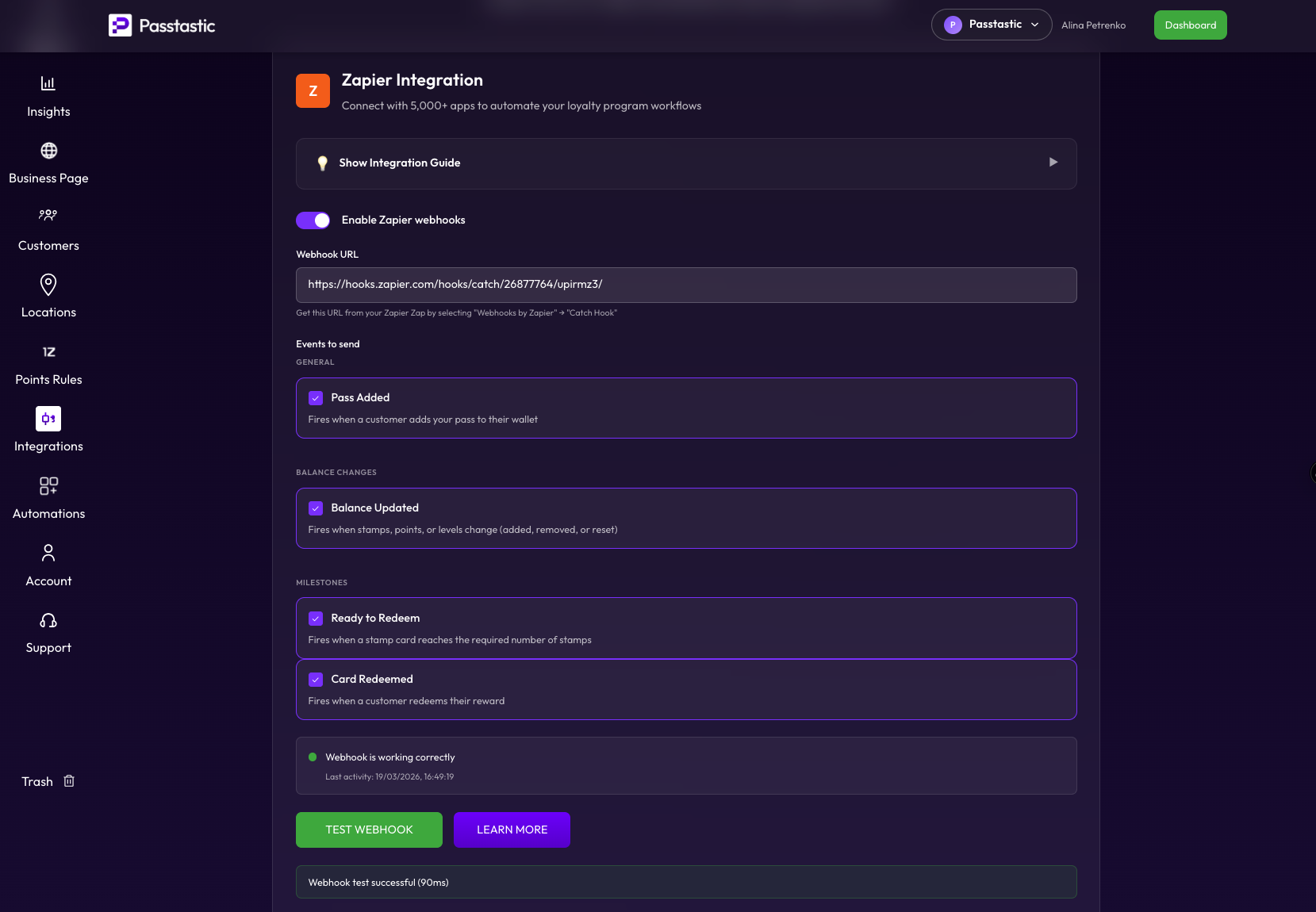
The events you see depend on your card type. Here's what each one does:
Pass Added — A customer adds your card to their Apple or Google Wallet. Available for all card types.
Balance Updated — A customer's stamps, points, or level changed. This happens when you add a stamp, add points, or when a level changes. Available for stamp cards, point cards, level cards, and coupons that convert to loyalty cards.
Ready to Redeem — A stamp card reached the required number of stamps and the customer can now claim their reward. Available for stamp cards and coupons that convert to stamp cards.
Card Redeemed — A customer redeemed their reward (used up their stamps, spent their points, or used a coupon). Available for stamp cards, point cards, and coupons.
Coupon Converted — A coupon was converted into a loyalty card. Available for coupons only.
Customer subscribes or unsubscribes — A customer's permission to get your marketing emails or text messages changed. For example, they clicked unsubscribe in one of your emails, or replied STOP to a text. Use it to keep the list in your email tool in step with Passtastic. Available for all card types. It fires when an existing member's status changes; for a brand-new member the status arrives with Pass Added. Zapier also gets a consent section with the channel (`email` or `sms`), the new status, and the source of the change: `unsubscribe_link` (the link in your email), `sms_stop` (a STOP reply), `import` (you imported the customer), `idosell` (synced from your IdoSell shop), `sign_up` (your sign-up form), or `portal` (the member turned text offers on or off on their own card page).
Member uses a benefit — A member used one of the benefits included with their card, for example their free drink of the month, at the counter or from your dashboard. Zapier gets which benefit it was (benefit title), how many they have used and how many they get (used_count, quantity), when it comes back if they just used the last one (renews_at), and the shop (location name). It also gets how often the benefit renews (period_unit) and when it was used (redeemed_at). period_unit is `days`, `calendar_month`, or empty for a one-time benefit, and the location name is empty when no shop was recorded. It is not sent when the benefit was already used up. Available for cards with included benefits, such as memberships and level cards.
Select your events
1. Click the events you want to enable. A purple border and checkmark shows it's selected.
2. Click Save at the bottom of the page.
Tip: Start with just Pass Added to get things working. You can always add more events later.
Marketing status on every event
Every event also tells Zapier whether the customer agreed to your marketing:
- email_marketing — `subscribed`, `unsubscribed` or `not_asked`
- sms_marketing — the same three values, for text messages
`subscribed` means the customer ticked the box on your sign-up form, you imported them with their consent, your IdoSell shop sync marked them as subscribed, or the member turned offers on in their own card page. `unsubscribed` means they opted out. Your imports and your sign-up form never override that, but the member can still subscribe again themselves. `not_asked` means they were never asked (for example, you imported them without consent): treat them as not subscribed.
Each status comes with changed_at, the date it last changed. Every event also carries member_id, a code that stays the same for the customer even if their email address changes.